Suno’s new Mashup feature goes live, letting you MAFO

Put two robots together!
Suno launched on Jan. 20, 2026, one of its most revealing features yet: Mashup, a beta tool that lets creators blend two of their own songs into something entirely new. Internally, Suno has a phrase for the experience: MAFO — Mashup And Find Out.
That phrase isn’t marketing fluff. It’s indicative of the AI music titan’s willingness to let the creator community play with the fledgeling tool.
“This is still totally experimental,” a Suno representative, “Luke,” explains in the official launch video (see below). “You’re not always going to get the perfect DJ mashup of your song. Sometimes it will take the lyrics of song A and the melody of song B — but that’s kind of part of the fun.”
Mashup isn’t about polish. It’s about recombination, unpredictability, and discovery — and it quietly points toward where Suno wants AI music to go next.
What Mashup actually does (in Suno’s own words)
At its core, Mashup allows you to take two existing Suno songs and fuse them into a new track. But Suno is explicit about what this is not meant to be.
“If you’ve ever wondered what it would be like to combine an indie acoustic folk song and a cyberpunk techno track — this is your chance to find out,” the video opens.
With that framing, it’s clear that Mashup isn’t a stem-aligned remix tool. It’s a creative collision engine. As demonstrated in the walkthrough, results can include:
lyrics from one song paired with another’s melody
vocalists trading lines mid-verse or mid-chorus
genre shifts that emerge only in certain sections
instrumental textures bleeding across songs
“Sometimes you’ll get lyrics from one part, melodies from another, and instrumentals from different sections,” Suno notes. “But it all kind of comes together.”
That “kind of” is doing a lot of work — and that’s intentional.
Source: Suno on YouTube
How Mashup works (and how to steer it — or not)
Suno makes it easy to start experimenting:
Start a Mashup
Drag a song into Create → Mashup, or
Use Remix/Edit → Mashup
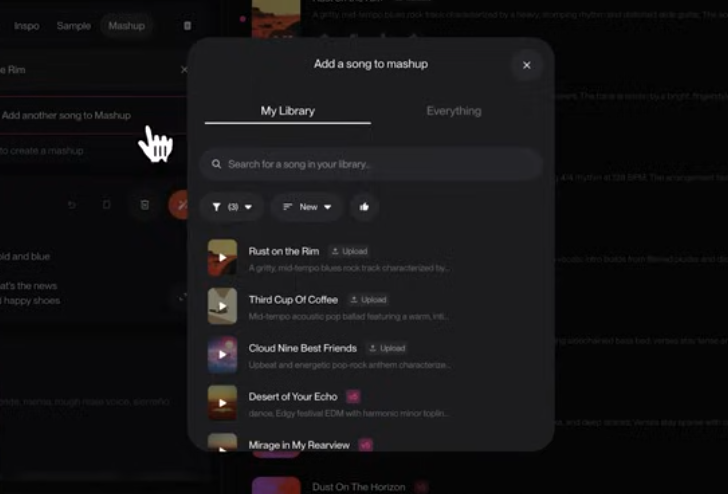
Add a second song
Pull from your library, or
Paste a Suno song link using Add another song → Everything
Handle lyrics your way
Click Mashup Lyrics to automatically blend both songs’ lyrics, or
Manually edit verses and choruses for more control
Decide how much chaos you want
Leave Style blank for a true MAFO experience, or
Add a genre to bias the output toward one song’s identity
“If you really liked the EDM part of one of the songs, you can put that style in here and it will lean in that direction,” the rep explains. “But I’ve been keeping it blank because I want to see what Suno actually does.”
That tension — between steering and surrendering — is where Mashup becomes interesting.
Less about remixing — more about active listening
What makes Mashup notable isn’t just the feature itself, but when it’s arriving.
In the wake of Suno’s licensing deal with Warner Music Group, the company has been clear that it intends to support new forms of fan interaction with music, not just generation. Mashup quietly previews that future.
We’ve previously described this shift as active listening: a mode where music isn’t just consumed, but interacted with, reshaped, and recontextualized — with rights holders in the loop.
Mashup precedes that functionality, but the connective tissue is obvious. Songs are no longer fixed endpoints. They’re inputs. Creative material that can be recombined, explored, and experienced differently each time.
Attribution and transparency (ahead of major label mashups)
One understated but important update: Mashup changes attribution.
“All of these mashups show where they came from,” Suno explains. Each generated track is labeled as a mashup and explicitly links back to both source songs, allowing listeners to trace the lineage and explore the originals.
In an ecosystem increasingly sensitive to provenance and rights, that transparency isn’t accidental. It’s foundational — especially when Mashup-like tools are later applied to licensed catalogs.
MAFO as a creative philosophy
Mashup won’t always give you something usable. Suno is upfront about that.
“We really want you to get in there and push the limits,” the rep says. “See what kind of weird fusions you can come up with.”
Sometimes the result is messy. Sometimes it’s confusing. And sometimes — when vocals trade lines, genres snap together, and melodies unexpectedly align — it’s something neither song could have become on its own.
That’s MAFO.
And in a world where many AI music tools optimize relentlessly for predictability and polish, Suno’s willingness to embrace uncertainty feels like a signal — not just about a feature, but about the future shape of listening itself.